
1. How to activate the Telehealth video consulting service
To activate the integrated Telehealth video service:
- Click on the ‘Add-Ons’ button in myMPS.
- Click on the ‘Activate’ button on the Telehealth tile.

- Check that you have read and accept the Terms of Service.
- Click ‘Proceed’
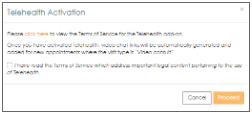
The Telehealth service will then be active and accessible from the myMPS Calendar.
Should you be looking for more information on the product, click on the ‘Info’ button on the right of the tile.
Comments
0 comments
Please sign in to leave a comment.